← Back to Measuring Guide

Build Your Door Schedule

Enter each door configuration, style, and the opening measurements you actually have. Add as many rows as needed. Nick's will review the schedule before final sizing.

Step 1

Customer Information

Tell us who the door schedule is for and how Nick's should contact you.

Step 2

Build Your Door Schedule

Add each different door configuration below. If several doors are the same size and style, enter them on one row and use Quantity. Use Duplicate when the next door is similar.

3 door rows
QtyDoor TypeStyle / Model Measurement Type Width Height Swing Jamb Depth Sidelites Actions

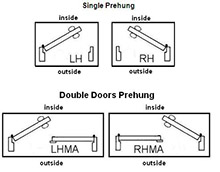
Measurements: Choose what you measured — Door Slab, Rough Opening, or Brick / Stone / Stucco Opening — then enter the width and height exactly as you took them; fractions are okay. For double doors, Ball Catch and Astragal are intentionally not requested. If you are unsure about handing or an opening measurement, choose Not Sure.

Notes Optional

Use this for overall project conditions, deadlines, special instructions, or questions.

Photos Optional

Upload photos of the existing doors, openings, or project conditions if they will help Nick's review the schedule.

Existing Entry / Exterior
Inside / Opening
Other Project Photos

Submit Door Schedule

Nick's will review the measurements and project information before final sizing. Final door sizing should always be confirmed before ordering.

We Make Custom Entry Doors and Glass Very Reasonable Pricing too! Call us for a quote 1-219-663-2279

Chicagoland Wood Doors Showroom is Open in Crown Point, Indiana - Dealers Welcome
Follow Nick’s Building Supply
Nick's Building Supply, Inc. 11100 Broadway, Crown Point, IN 46307 1-219-663-2279
© 1999-2026 Nicks Building Supply, Inc. All rights reserved.